Reading Barcodes from a Zebra DS4308 over USB CDC
The Zebra DS4308 is a handheld 2D imager, the kind of barcode scanner you’ll find at a till or warehouse workstation. Out of the box it emulates a USB HID keyboard - you scan the barcode, and the decoded text appears wherever your cursor happens to be, typed out one keystroke at a time in quick succession. This keyboard mode needs no driver on Linux, which is why it’s the factory default. It’s fine if you’re only scanning barcodes with characters that can be typed on a keyboard, but becomes problematic if your barcodes contain exotic characters. Anything outside the current keyboard layout has to go through Alt-compose sequences (Windows only). It has other annoyances too: how it interacts with caps lock, or which field happens to have focus.
USB CDC (Communications Device Class, specifically the ACM subclass) is the alternative. Instead of a keyboard, the scanner appears as a virtual serial port, and you read raw bytes from it at your leisure instead of keystrokes being pushed into whatever has focus. It gives you the bytes that the barcode actually contains rather than trying to express them as character keypresses - you can then decode these bytes reliably into text strings. On Linux the CDC ACM driver (cdc_acm) is built into the kernel, so there’s nothing to install. This post is about Linux only; the arrangements for Windows/macOS are different.
When in USB HID mode, you’ll see it configured like this:
$ lsusb
Bus 001 Device 012: ID 05e0:1200 Symbol Technologies Bar Code Scanner

$ lsusb -v -d 05e0:1200   # key descriptors, abridged
  bDeviceClass            0 [unknown]
  idVendor           0x05e0 Symbol Technologies
  idProduct          0x1200 Bar Code Scanner
  iManufacturer           1 Symbol Technologies, Inc, 2008
  iProduct                2 Symbol Bar Code Scanner
    bNumInterfaces          1
      bInterfaceClass         3 Human Interface Device
      bInterfaceSubClass      1 Boot Interface Subclass
      bInterfaceProtocol      1 Keyboard

$ lsusb -t
    |__ Port 005: Dev 012, If 0, Class=Human Interface Device, Driver=usbhid, 12M
Switching the scanner into USB CDC mode
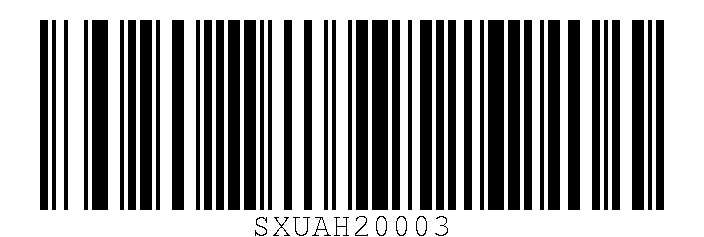
Zebra scanners are configured by scanning special barcodes. A config barcode is an ordinary Code 128 symbol with a leading FNC3 codeword tacked onto the front, which marks the symbol as a programming command rather than ordinary data to be read.
The DS4308’s Product Reference Guide lists the USB Device Type options as a set of short payload strings:
SXUAH20003   *USB HID Keyboard (factory default)
SXUAH20005   Simple COM Port Emulation
SXUAH2000B   USB CDC Host                    <- what we want
SXUAH2000E   SSI over USB CDC
SXUAH20009   SNAPI with Imaging Interface
SXUAH2000A   SNAPI without Imaging Interface
Scan the barcode below to put it into USB CDC Host mode:
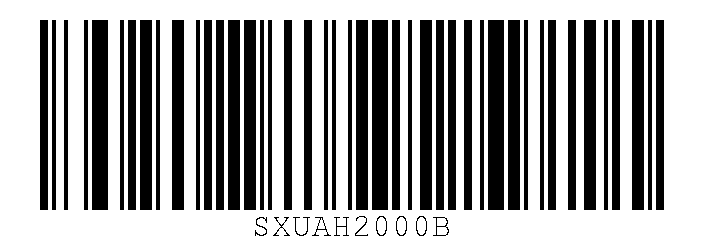
Nothing obvious will happen, but the scanner will make a sound as it restarts with the new settings - this sound is not the normal beep you get when scanning. You should now see it appearing as a different device:
$ lsusb
Bus 001 Device 013: ID 05e0:1701 Symbol Technologies Bar Code Scanner (CDC)

$ lsusb -v -d 05e0:1701   # key descriptors, abridged
  bDeviceClass            2 Communications
  idVendor           0x05e0 Symbol Technologies
  idProduct          0x1701 Bar Code Scanner (CDC)
  iManufacturer           1 Symbol Technologies, Inc, 2008
  iProduct                2 Symbol Bar Code Scanner
    bNumInterfaces          2
      bInterfaceClass         2 Communications
      bInterfaceSubClass      2 Abstract (modem)
      bInterfaceProtocol      1 AT-commands (v.25ter)
      bInterfaceClass        10 CDC Data
      bInterfaceSubClass      0 [unknown]
      bInterfaceProtocol      0

$ lsusb -t
    |__ Port 005: Dev 013, If 0, Class=Communications, Driver=cdc_acm, 12M
    |__ Port 005: Dev 013, If 1, Class=CDC Data, Driver=cdc_acm, 12M
Same VID (05e0, Symbol Technologies, now Zebra), different PID: 1200 for HID, 1701 for CDC. The CDC driver sets up a device /dev/ttyACM0.
/dev/ttyACM* devices are owned by root:dialout, so your user needs to be in that group:
sudo usermod -aG dialout "$USER"
Group membership only updates on a fresh login, so either log out and back in, or run newgrp dialout in your current shell. If you get a PermissionError later, it’s probably down to your effective group membership.
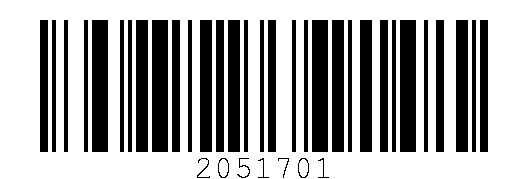
For some reason, this scanner doesn’t consistently send the ECI data needed to identify the correct encoding unless you put it in AIM Code ID mode:
Setting up the environment
A minimal uv project needs pyserial for the serial port; pyStrich is optional, only for generating the barcodes:
uv init --python 3.11 ds4308-cdc-reader
cd ds4308-cdc-reader
uv add "pyserial>=3.5" "pyStrich[png]==0.20"
Finding the serial port device
Rather than hardcode /dev/ttyACM0, it’s more robust to find the port by USB vendor ID, so it still finds the scanner if the device number changes (e.g. because you have multiple virtual serial ports and they’re renumbered after a reboot or hotplug). Symbol Technologies/Zebra is 05e0, and we can use udevadm to list the devices.
#!/usr/bin/env -S uv run --script
# /// script
# requires-python = ">=3.11"
# dependencies = ["pyserial>=3.5"]
# ///
import subprocess
from pathlib import Path

ZEBRA_VID = "05e0"


def find_acm_by_vid(vid: str) -> Path | None:
    """Return the first /dev/ttyACM* whose USB vendor id matches, else None."""
    for dev in sorted(Path("/dev").glob("ttyACM*")):
        try:
            info = subprocess.run(
                ["udevadm", "info", "-q", "property", "-n", str(dev)],
                capture_output=True, text=True, check=True,
            )
        except (subprocess.CalledProcessError, FileNotFoundError):
            continue
        if f"ID_VENDOR_ID={vid}" in info.stdout:
            return dev
    return None
Reading from the scanner
Opening the port is a plain pyserial open:
import serial

port = serial.Serial(str(port_path), 9600, timeout=0.1)
The baud rate is nominal here - it isn’t meaningful over CDC ACM - and the 8N1 defaults are fine as they are.
There’s no length field, no header, and, by default, no terminator on the wire. One scan is just the raw bytes of whatever the symbol encodes. What does mark the boundary is the line going quiet. In practice, no more bytes arrive within about half a second of the last byte of a scan, so a read loop can accumulate bytes and treat a gap of that length as “record complete”:
import time

READ_CHUNK = 256
QUIET_GAP_S = 0.5  # a scan is "complete" once the line is silent this long

buf = b""
last = time.monotonic()
with port:
    while True:
        chunk = port.read(READ_CHUNK)
        now = time.monotonic()
        if chunk:
            buf += chunk
            last = now
        elif buf and now - last > QUIET_GAP_S:
            print(f"raw={buf!r}", flush=True)  # flush=True to avoid output buffering
            buf = b""
With the scanner in CDC mode and AIM Code ID enabled, as above, a scan on the wire looks like this:
]d4\000026<symbol data bytes>
^^^ ^^^^^^^ ^^^^^^^^^^^^^^^^^^
|   |       symbol data, encoded however the ECI number says
|   AIM ECI escape: 5C 30 30 30 30 32 36 (backslash, then ASCII digits "000026" = ECI 26)
AIM symbology identifier: "]" + code char "d" + modifier char "4"
Every record is prefixed with a 3-byte AIM symbology identifier, and every ECI is announced with its \nnnnnn escape:
A UTF-8 Data Matrix:
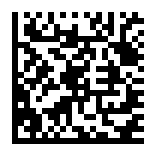
raw=b']d4\\000026cafe \xe2\x98\x95 \xce\xa9 \xe4\xb8\xad' -> 'cafe ☕ Ω 中'
A Shift-JIS QR code:
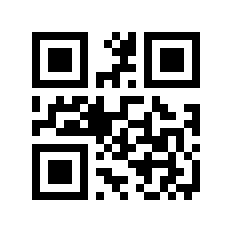
raw=b']Q2\\000020\x93\xfa\x96{\x8c\xea\x83e\x83X\x83g' -> '日本語テスト'
A Latin-1 QR code:
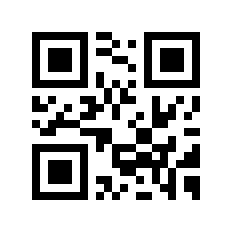
raw=b']Q2\\000003caf\xe9 \xf1 \xfc \xdf' -> 'café ñ ü ß'
A QR code mixing ASCII, Shift-JIS kanji and halfwidth katakana:
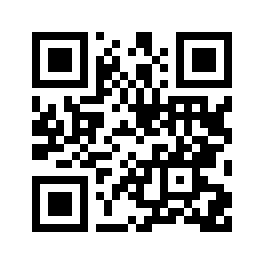
raw=b']Q2\\000020ABC \x93\xfa\x96{\x8c\xea \xb6\xc0\xb6\xc5 123' -> 'ABC 日本語 カタカナ 123'
An AIM identifier is three bytes: the ] flag character, a code character identifying the symbology, and a modifier character. ]d4 is Data Matrix ECC 200 with the ECI protocol implemented; ]Q2 is QR Model 2, also with ECI implemented.
Given the above, decoding a record from the CDC stream is four steps: strip the AIM identifier if present, read the ECI escape if present (defaulting to ECI 3 if not), map the ECI number to a codec, then un-double any literal backslashes before decoding:
import re

# AIM symbology identifier: "]" + a code character + a modifier character (3 bytes).
_AIM_ID_RE = re.compile(rb"^\].{2}", re.DOTALL)

# AIM ECI escape: backslash + exactly six ASCII digits.
_AIM_ECI_RE = re.compile(rb"\\(\d{6})")

# ECI assignment number -> Python codec. ECI 3
# (iso-8859-1 or Latin-1) is both the default and the fallback for anything unmapped.
ECI_CODECS = {
    2: "cp437",
    3: "iso-8859-1", 4: "iso-8859-2", 5: "iso-8859-3", 6: "iso-8859-4",
    7: "iso-8859-5", 8: "iso-8859-6", 9: "iso-8859-7", 10: "iso-8859-8",
    11: "iso-8859-9", 12: "iso-8859-10", 13: "iso-8859-11", 15: "iso-8859-13",
    16: "iso-8859-14", 17: "iso-8859-15", 18: "iso-8859-16",
    20: "shift_jis", 21: "cp1250", 22: "cp1251", 23: "cp1252", 24: "cp1256",
    25: "utf-16-be", 26: "utf-8", 27: "ascii", 28: "big5", 29: "gb2312",
    30: "euc_kr", 32: "gb18030", 33: "utf-16-le", 34: "utf-32-be",
    35: "utf-32-le", 170: "ascii",  # 170 = ISO 646 Invariant
}


def decode_scan(raw: bytes) -> str:
    """Decode one scan record from the CDC stream."""
    body = raw
    aim_id = _AIM_ID_RE.match(body)
    if aim_id:
        body = body[aim_id.end():]

    eci_esc = _AIM_ECI_RE.match(body)
    if eci_esc:
        eci = int(eci_esc.group(1))
        body = body[eci_esc.end():]
    else:
        eci = 3

    codec = ECI_CODECS.get(eci, "iso-8859-1")
    body = body.replace(b"\\\\", b"\\")  # un-double literal backslashes
    try:
        return body.decode(codec)
    except UnicodeDecodeError:
        return body.decode("iso-8859-1")
Putting it together, with the imports, find_acm_by_vid, decode_scan, ECI_CODECS and the regexes from above - we can get the output you’ve seen above:
def main() -> None:
    port_path = find_acm_by_vid(ZEBRA_VID)
    if port_path is None:
        raise SystemExit("no Zebra CDC device found")

    buf = b""
    last = time.monotonic()
    with serial.Serial(str(port_path), 9600, timeout=0.1) as port:
        while True:
            chunk = port.read(READ_CHUNK)
            now = time.monotonic()
            if chunk:
                buf += chunk
                last = now
            elif buf and now - last > QUIET_GAP_S:
                print(f"raw={buf!r}  ->  {decode_scan(buf)!r}", flush=True)
                buf = b""


if __name__ == "__main__":
    main()
Save the pieces above into one file. The # /// script header at the top is inline metadata, so you can run it with uv run reader.py without setting up a project - uv reads the dependencies and Python version from the header and fetches pyserial itself. With the shebang you can also chmod +x reader.py and run ./reader.py directly.
For convenience, I’ve put the whole script in a Github gist.
Miscellanea
If you hear a warning beep and a red light shows, this probably means your programme is not connecting to the serial port.
If you want to get back to USB HID mode:
This post is specific to the Zebra DS4308, but other Zebra models also support USB CDC and can be used in the same way. The control barcodes in this post are likely to be specific to this model or model series of hardware - check your manual if using a different model.
Every barcode in this post was generated with pyStrich.
The Zebra DS4308 is a discontinued model. Mine was manufactured in November 2018 according to its label. At the time of writing the DS4308 product reference guide is still available from the Zebra website.
If you wanted to have what you’ve read injected into a GUI application like USB HID mode does, you’d need to take this a step further and emulate the input. That’s beyond this blog post, but libei is probably what you need.